General Point Properties
Use the General page to view, select, and edit general point settings for a particular point.
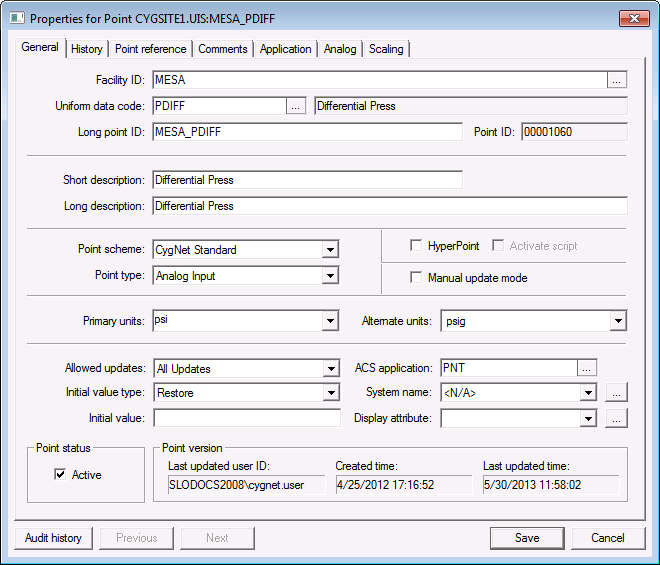
|
| Click the thumbnail to see a sample General page for an Existing Point |
General Properties
These are the properties shown on the General page in the PNT Editor.
See Token Categories - Point: General for the corresponding tokens for each property and Filter Attributes - Point: General for the corresponding filter attributes for each property.
| Property | Description | Default Value | ||||||
|---|---|---|---|---|---|---|---|---|
|
Site.service |
This field is only available when adding a new point. Site and Service are used in conjunction to identify the current value service of the point. A PNT can store points for any current value service. Maximum length is 8 characters. Click … to select a Service. |
N/A |
||||||
|
Facility ID |
ID of the point’s facility. Up to 20 characters. No spaces. |
N/A |
||||||
|
Uniform data code |
UDC of the point. Up to 10 characters. No spaces. If the UDC is in the TRS, the UDC is displayed and serves as the default for the point description. If the UDC is not in the TRS, the UDC description shows as <not found>. Click … to select a UDC. The actual UDC is accompanied by its UDC Description. |
N/A |
||||||
|
Long point ID |
The long identifier of the point. CygNet naming standards for point identifiers are as follows:
Note: The dash (-) and the tilde (~) are also valid characters but are not recommended. |
Blank unless values are specified for Facility ID and UDC. Then the default is a concatenation of those fields. |
||||||
|
Point ID |
The identifier of the point. CygNet naming standards for point identifiers are as follows:
Note: The dash (-) and the tilde (~) are also valid characters but are not recommended. |
Auto-numbered |
||||||
|
Short description |
Description of the point. Free-form text up to 24 characters. |
Blank unless value is specified for the UDC. Then the default is the first 24 characters of the UDC description. |
||||||
|
Long description |
Description of the point. Free-form text up to 80 characters. |
Blank unless value is specified for the UDC. Then the default is the UDC description. |
||||||
|
Point scheme |
The Point Scheme governs system-wide alarm priorities, alarm categories, alarm colors, point states, etc. See Point Scheme or Understanding the CvsMetadata File for more information. |
CygNet Standard |
||||||
|
The point data type. Options are:
See Point Types for more information. |
Analog Input |
|||||||
|
Enables the point as a HyperPoint. Options are 0 (No) or 1 (Yes). See HyperPoint Scripting for more information. |
0 (No) |
|||||||
|
Activate script |
Enables the point’s script if the point is a HyperPoint. Options are 0 (No) or 1 (Yes). |
0 (No) |
||||||
|
Click to enable manual update mode (aka manual mode) for the point record. When enabled the associated Current Value Service is blocked from updating the point. Options are 0 (No) or 1 (Yes), the default value is 0 (No).
|
0 (No) |
|||||||
|
Specifies the primary units of measure. A drop-down menu is provided for selection. CygNet Software supports aliases for some unit names, which can be typed manually in the Primary Units fields on the General page in the PNT Editor. Examples include: plural or singular forms of common units, e.g., barrels for barrel, calorie for calories, and feet for foot; or other abbreviations, e.g., A for amp, CBM for cubic meter, forward slash (/) for per, and yrs for years. Accepted unit aliases will be converted to standard engineering units when specified in a point's configuration record or associated data group. |
Blank (no selection) |
|||||||
|
Alternate units |
Specifies alternative units of measure. A drop-down menu is provided for selection. ExampleAlternative units could be C for Celsius instead of F for Fahrenheit, or US gallon instead of barrel for a tank level. |
Blank (no selection) |
||||||
|
Specifies the allowable point update type. For instance, “All Updates,” which is the default, indicates that both a user or the system can update the point record. Options are:
|
All Updates |
|||||||
|
ACS application |
Specifies the name of the security application that governs security for the point. Click … to select an application. |
N/A |
||||||
|
The Initial value type property specifies the type for the point's initial value.
|
Restore |
|||||||
|
System name |
Value from CMSYS table. |
N/A |
||||||
|
Initial value |
Options are:
|
N/A |
||||||
|
Display attribute |
Value from the PNTDISP table. |
N/A |
||||||
|
Point status |
Enables the point as Active (or inactive). Can only be edited after the point has been created. |
Active | ||||||
| Point version | ||||||||
|
Last updated user ID |
The user ID of the last user to edit the point. |
Informational only |
||||||
|
Created time |
The timestamp when the point was created. |
Informational only |
||||||
|
Last updated time |
The timestamp when the point was last updated. |
Informational only |
||||||


